
THE HYBRID REALITY
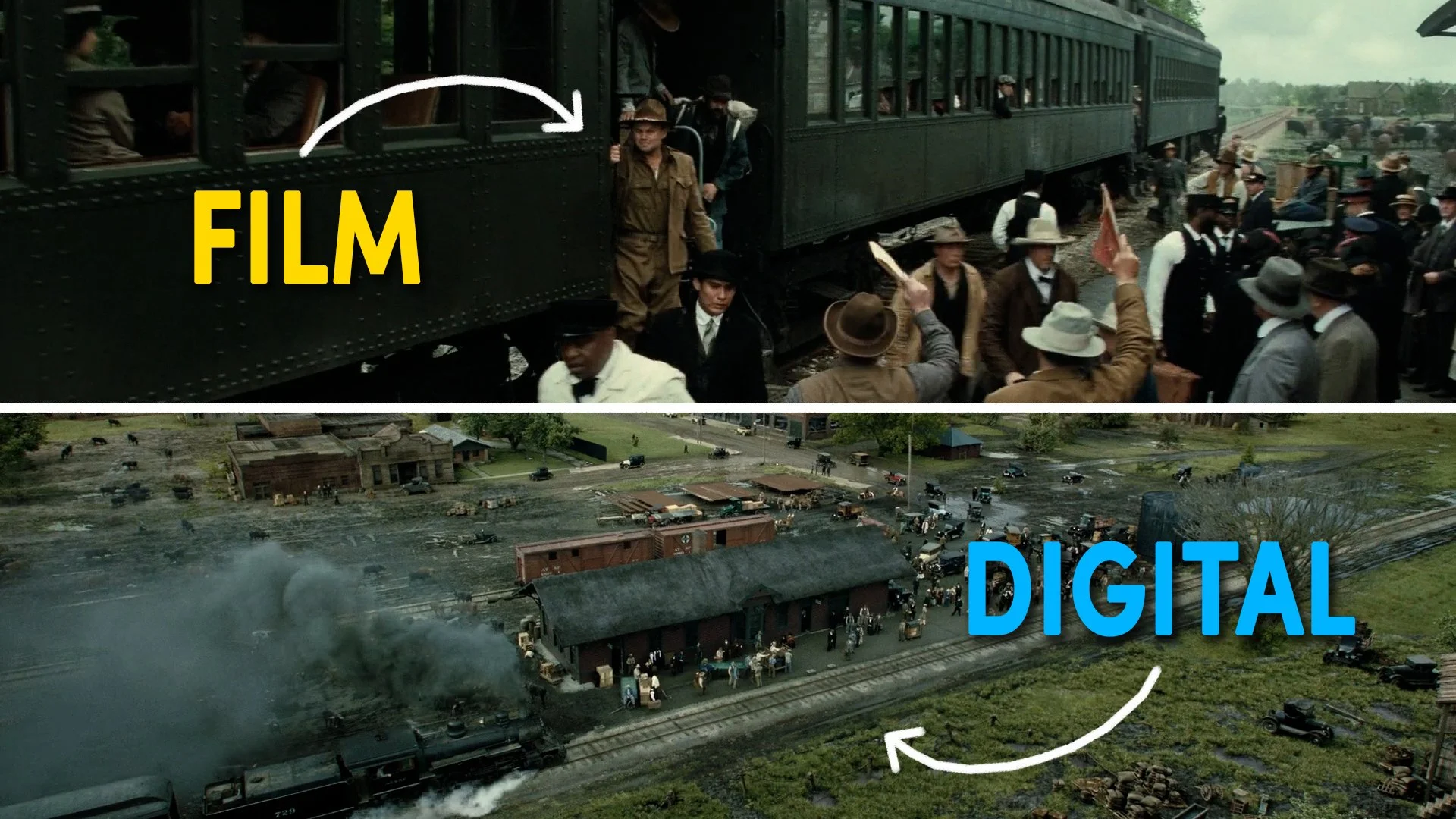
Some productions today shoot on both film and digital cameras interchangeably, and I challenge anyone to spot the difference. Take an example like Marty Supreme, which cinematographer Darius Khondji shot on both Kodak film and the digital Arri Alexa 35. Are you able to spot which was captured digitally and which on film?

I think most people, including myself, can’t. Proving that when digital footage is put through a high end film emulation workflow, the gap between the two mediums vanishes.
Even in this digital era, the film look still remains deeply popular and sought after. As I mentioned in a previous video, there has been a noticeable rise in productions choosing to shoot on film, proving that the aesthetic and workflow of physical stock are still wildly desirable to many DPs.
However, most productions simply can’t shoot on film. Perhaps because of a total lack of processing labs in your geographical area, the high costs of buying and developing stock, or the difficulty of finding specialized crew like experienced loaders or focus pullers who can pull by distance alone.
There’s also a lack of certainty on set when shooting on film - without a high-fidelity, real-time digital monitor feed that shows exactly what you’re capturing, getting predictable exposure results requires not only specialised photographic skills but also confidence and faith from directors and producers.
Because of these sorts of bottlenecks, many filmmakers who want a film look now shoot with a digital camera and rely on post-production tools to recreate that analog magic.
MEDIUM-DRIVEN VS. DATA-DRIVEN
I’m not going to do a Resolve grading tutorial, or go into the complex maths and algorithms designed to emulate film which is a massive rabbit hole. If you want a deep technical dive into this, I highly recommend Steve Yedlin’s video on the subject which I’ll link below.
Instead, I want to break down the tangible characteristics of film and look at how we can practically apply them using modern colour software and tools.
Historically, a movie's look was determined to a large extent by the physical medium. Filmmakers selected specific film stocks, worked with different film gauges like 16mm or 35mm, or relied on laboratory processing techniques like pushing, pulling, or bleach bypass to shape the image’s colour and texture.
Film cameras shot with negative film - which were designed with wide dynamic range and inverted colours to record as much scene detail as possible. This was then transferred to a positive print film, like Kodak 2383 that could be used to project movies in theaters, with more contrast, rich saturation, and distinct color separation.
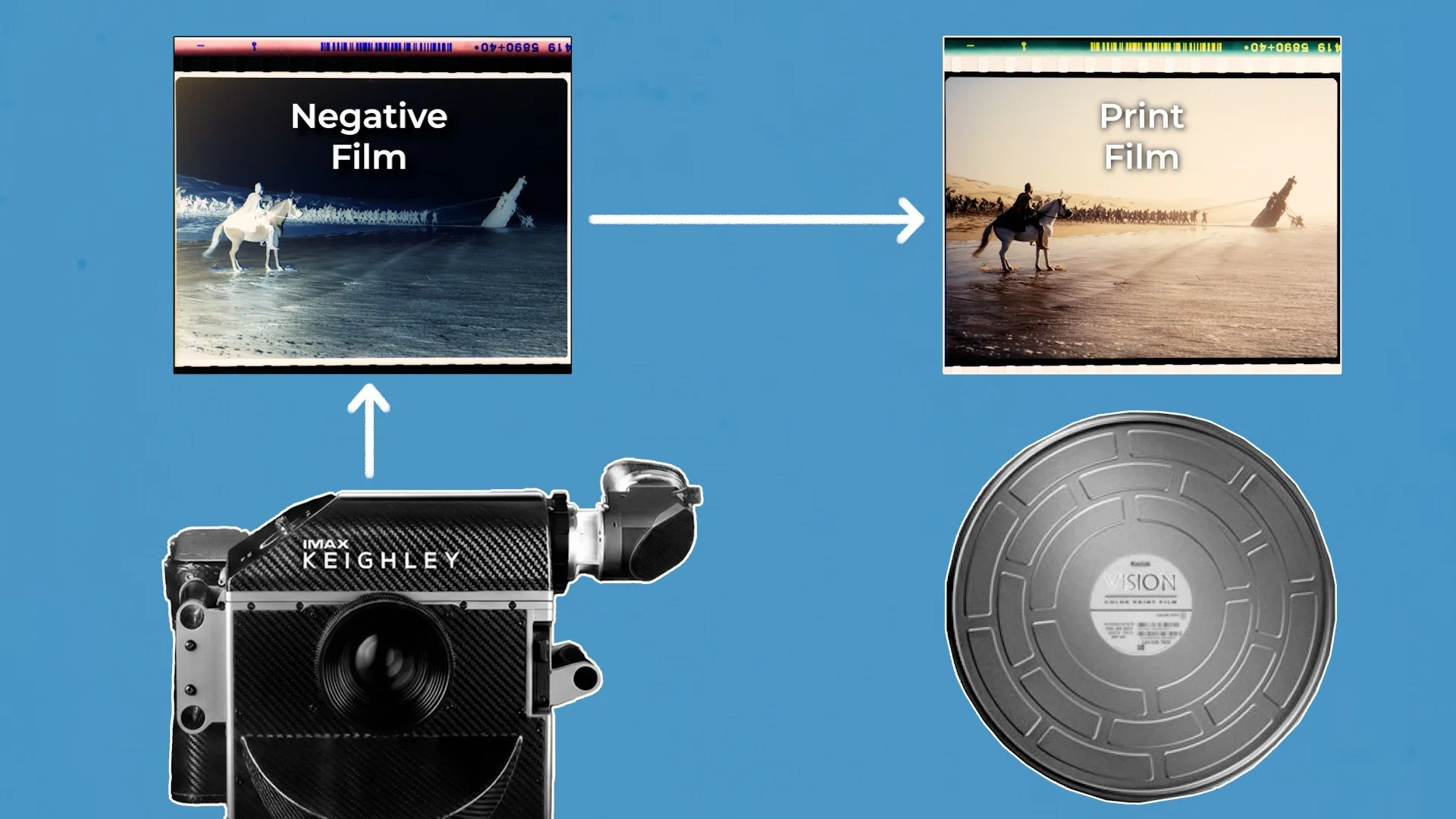
Today, digital cameras operate more like data capture devices, designed to capture as great a dynamic range as possible. They record clean, flat, neutral data, in the form of log or RAW footage, that is meant to be manipulated in a post-production pipeline to get more vibrant colour.
Look-Up Tables, or LUTs, have effectively become our modern-day film stocks and lab processing choices.
You can think of a LUT as being like an Instagram filter that changes the colour and contrast in a video - giving you different types of looks.
Changing the LUT changes the way that colour and contrast are translated. So you can have a black and white LUT that strips out all the colour, a Rec. 709 LUT that produces standard, natural tones, or a LUT that tries to emulate the look of film - like Kodak 250D.
THE FILM LOOK
When we talk about using digital tools to build a filmic look, what specific visual traits are we actually trying to emulate? I’d break the film look down into four main characteristics.
First is the film print curve. This gives you high contrast compared to a flat digital log image, featuring a gentle, non-linear S-curve with soft highlight roll-off and rich, compressed, dense shadows.

Second is color and density. Print stocks often push warmer, creamy highlights and cooler, cyan shadows. Film also exhibits subtractive color density - unlike digital video where colors get brighter as they saturate, film colors darken as they become more saturated, creating deep, rich tones.

Third is texture. Film grain isn't digital noise; it consists of physical silver halide crystals and dye clouds. Grain sits heavily in the midtones and shadows while clearing up in bright highlights, adding a tactile sense of depth. The intensity of the grain is determined by the film gauge with smaller gauges like 8mm or 16mm having strong grain and less overall sharpness and higher gauges like 65mm being much finer grain and capable of resolving sharper detail.

Fourth is halation. When bright light penetrates the film emulsion, it bounces off the backing plate inside the camera and hits the light-sensitive layers from behind. This creates a soft, warm reddish glow along high-contrast edges or the sharpest, brightest highlight point in the image. This warm edge glow is most noticeable on bright light sources, like an undiffused, direct practical light.

BASIC GRADING WORKFLOW
While the exact grading steps will vary slightly depending on the software you use, colourists generally rely on a structured, node or layer-based pipeline to turn RAW or log files into a filmic image.
Different colorists might place these elements in slightly different positions within their node tree, but this gives you the gist of how the workflow functions behind the scenes.

The foundation of this process usually begins with a Color Space Transform, CST, or setting your colour managed project settings. This establishes control by taking the exact camera profile and gamma curve you shot on - like Sony S-Log3.Cine or Blackmagic RAW or Arri Log C - and translating it into a standard deliverable color space, typically Rec.709 with a 2.4 gamma for standard screens.
From there, colorists can introduce a LUT node, which acts as your digital film stock to set the look of the image. There are many different LUTs out there that try to emulate different types of film from a Kodak 2383 print LUT to Kodak 250D or 500T, or even other discontinued stocks, like Fujifilm.
At this point you can also create a camera monitoring LUT, for use on set. Such as this LUT which is set up for Sony footage. It doesn't bake the look permanently into the recorded footage. Instead the file is loaded into the camera and processes the S-Log3 footage in real time, converting it to Rec.709 with a Kodak film look applied, so we can evaluate the image on set as we shoot with a realistic preview of our post-production pipeline.
Coming back to the grade, extra correction nodes or layers can now be added.
Primary colour correction nodes allow you to adjust things like white balance, shift exposure, and match shots across a scene.
Finally, texture elements like grain can be added to emulate the look of film, or you can finish off with a halation node to recreate that subtle red and orange glow along sharp highlight edges.
THE TRUTH ABOUT GRADING FILM
Here is an often-forgotten truth: whether a production shoots on physical film or a digital sensor, colorists will still use a LUT and perform digital colour corrections.
You could take two shots on the exact same film stock, lighting and lensing and they can be made to look completely different based on the choices made in the color grade.
Shooting on film doesn't automatically lock you into one single, unchangeable look. Scene-by-scene color correction, or creating a custom look for the project, is always part of the process.
COLOUR IS SUBJECTIVE
All this to say that color is completely subjective. Just like choosing lenses, lighting setups, or framing, you can isolate the specific visual elements you like to build a custom look for your project.
If you love film color science but prefer a cleaner aesthetic, you can use a film LUT while forgoing halation and grain.
Or, if you want a heavy, vintage feel, you can stack intense 16mm grain, aggressive edge halation, and a steep print curve onto your digital footage.
Having digital post-production tools gives us total creative control. Rather than striving for rigid, pure film emulation just for the sake of it, break down the look you enjoy, apply what serves your story, and tailor the grade to give every scene the exact feeling it needs.